Generate QA, CoT, or Summary Dataset from Documents (synthetic-dataset-kit)
The synthetic-dataset-kit plugin creates synthetic datasets from your uploaded documents using powerful local language models. It supports three generation modes: QA (Question Answering), CoT (Chain of Thought), and Summary, allowing you to create a wide range of fine-tuning datasets.
⚠️ Important Notes
- This plugin only works with local models that are compatible with vLLM.
- GGUF models, non-vLLM models, and proxy-backed models will not work.
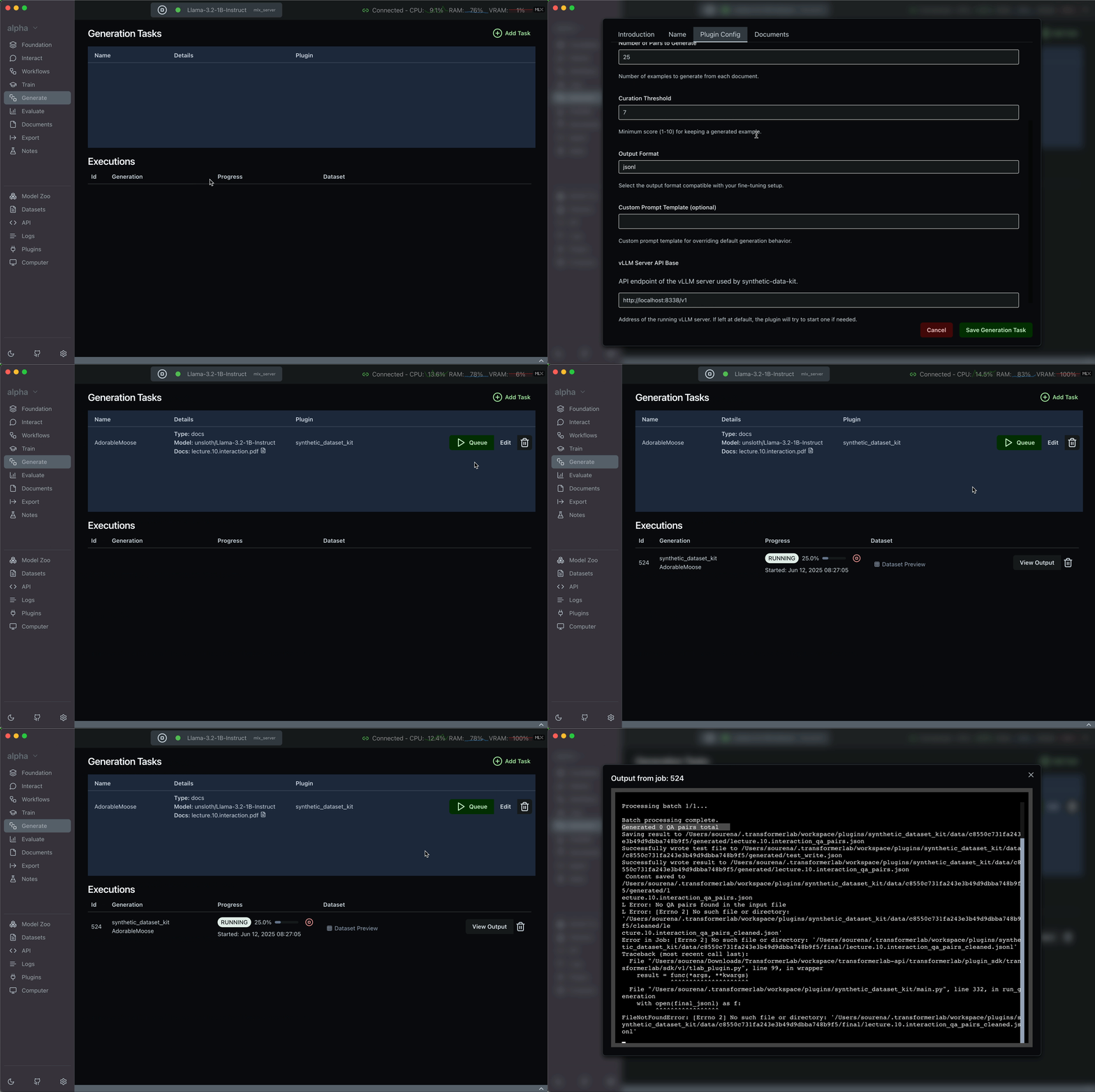
- If the job fails with the output displaying
0 QA pairs generated, the typical reason is none of the generated examples passed the Curation Threshold.
- To fix this, try lowering the Curation Threshold and rerun the job. You can view job logs to investigate further.
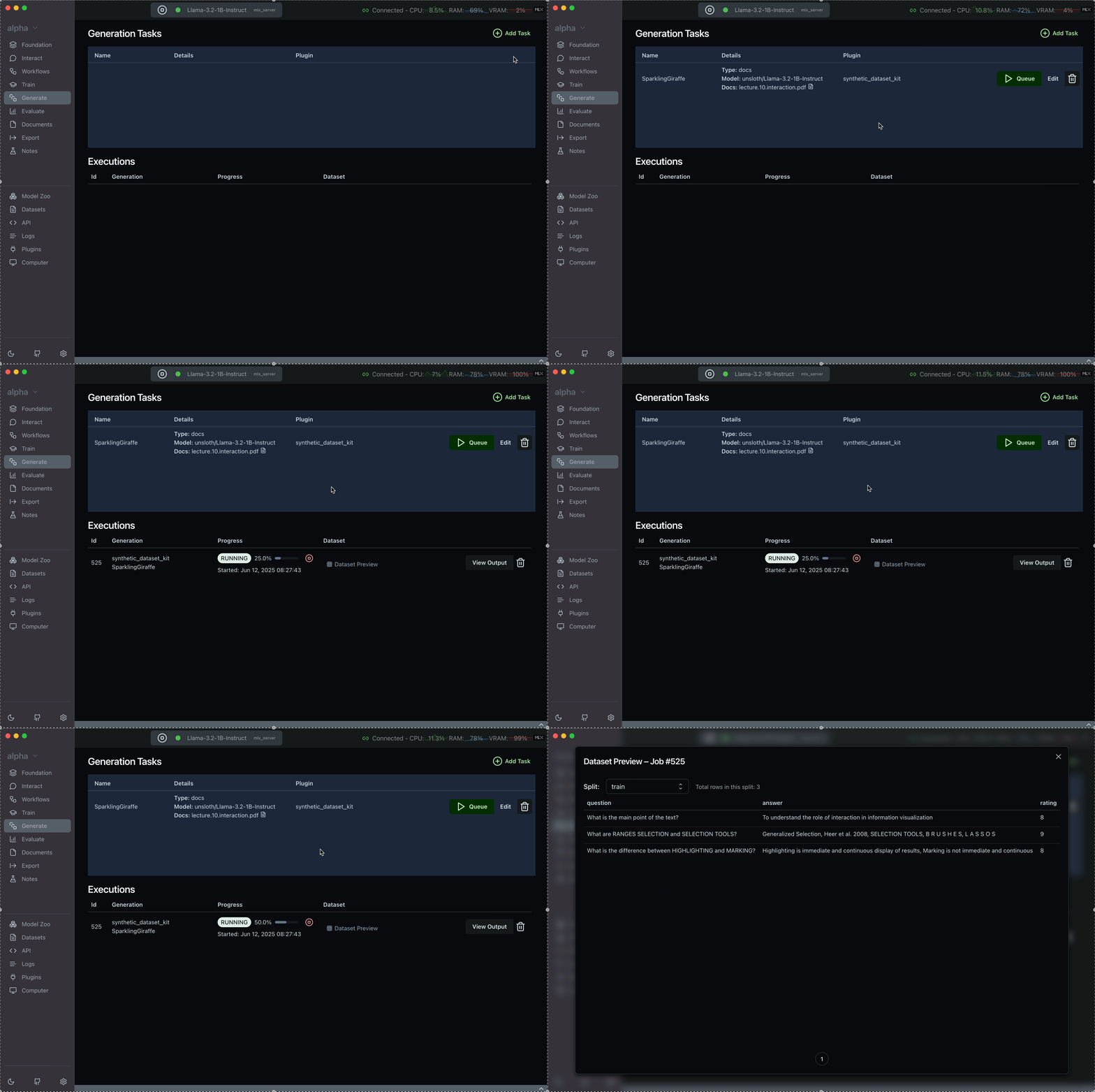
Step 1: Upload Reference Documents
Upload your documents in the Documents tab.
Step 2: Configure Generation Parameters
When launching a generation job with synthetic-dataset-kit, configure the following parameters:
| Parameter | Description | Required | Example |
|---|---|---|---|
Generation Model | Must be local (downloaded via Model Zoo) and vLLM-compatible1. No external or proxy-backed models supported. | ✅ | local |
Generation Type (task_type) | Select what to generate: QA pairs, Chain of Thought examples, or Summaries | ✅ | qa, cot, summary |
Number of Pairs to Generate | Total examples to create per document | ✅ | 100 |
Curation Threshold | Min score (1–10) a generated sample must meet to be included | ✅ | 7.0 |
Output Format | Choose the output format for the dataset | ✅ | jsonl, alpaca, chatml |
Custom Prompt Template | (Optional) Override the default prompt used for generation | ❌ | Your prompt here |
vLLM Server API Base | Endpoint of the vLLM server (usually default) | ✅ | http://localhost:8338/v1 |
In order to get the best results out of the plugin try using models with at least 8B parameters and above.
Note that the output structure for generating a summary of a chain of thought (cot) from a reference document must be selected as chatml.
Step 3: Review the Output
After generation completes, you can preview the dataset in two places:
- In the Generate tab: Click the
Dataset Previewbutton on the completed job. - In the Datasets tab: The generated dataset will appear in the
Generated Datasetstab.
Troubleshooting
- No data generated?
- If output says
0 QA pairs generated, the job has failed (not succeeded). - This is usually due to a too-high curation threshold—try reducing it to
6.0or lower. - Review job logs for specific reasons.
- If output says
-
Model not responding?
- Check that your selected local model is compatible with vLLM and that the vLLM server is running at the configured
vllm_api_base.
- Check that your selected local model is compatible with vLLM and that the vLLM server is running at the configured
-
Want more creative generations?
- Use a custom prompt template.
- Consider lowering the curation threshold slightly and reviewing outputs manually.
Footnotes
-
To check if your model is vLLM-compatible, see the vLLM Supported Models list. vLLM currently supports many popular architectures like LLaMA, Mistral, Falcon, Baichuan, and more. Ensure your model is in a supported architecture and format (e.g., Hugging Face Transformers or Safetensors, not GGUF). ↩